Showing posts with label os tool. Show all posts

Saturday, 19 January 2013

[Update] Signed Alchemy OS 1.4.4 new


Alchemy OS v1.4.4
New updated on September 1 2012 version uploaded.
Features: 

•Fixed installation in native file system
•Fixed troubles with terminal on some devices


 Alchemy OS 1.4.4.jar 147.65 KBhere

Alchemy OS 1.4.4 Signed file here
Jar:
 Alchemy OS 1.4.4-Signed.jar 147.65 KBhere
Jad:
 Alchemy OS 1.4.4-Signed.jad 6.11 KBhere

Alchemy OS is a software development and distribution platform for mobile phones with Java support. Although this is not an operating system in the full sense, it provides rich platform to develop, compile and run applications directly in the phone, as well as install already written applications. 
Features: 
•Configurable environment 
•File system emulation 
•Multitasking 
•Work with graphics 
•Built-in compiler
 

System requirements: 
•Phone with Java ME supporting specifications MIDP-2.0 and CLDC-1.1 
•At least 400 KB of free space (at least 4 MB if you are using native file system)

Tuesday, 15 January 2013

Alchemy OS 1.4.5 updated


Alchemy OS v1.4.5 by gokume001
New updated on October 4 2012 version uploaded.
Features:

 Alchemy OS v1_4_5_jar.zip 148.54 KB here

• Various fixes in installer
• Fixes in JSR-75 filesystem driver
• Fixed function edititem_set_text()
• Terminal input is set to lowercase letters by default
• Program pkg-arh is included in installation - to install package from .pkg file use
pkg-arh install file.pkg
• All core programs are refreshedto their latest versions


Alchemy OS

Alchemy OS is a software development and distribution platform for mobile phones with Java support. Although this is not an operating system in the full sense, it provides rich platform to develop, compile and run applications directly in the phone, as well as install already written applications. 
Features: 
•Configurable environment 
•File system emulation 
•Multitasking 
•Work with graphics 
•Built-in compiler
 

System requirements: 
•Phone with Java ME supporting specifications MIDP-2.0 and CLDC-1.1 
•At least 400 KB of free space (at least 4 MB if you are using native file system)


Sunday, 13 January 2013

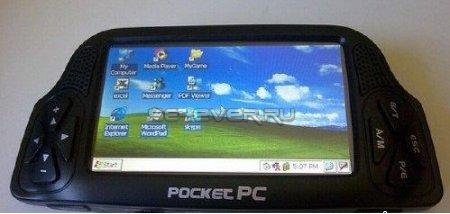
[executes .exe]JPC x86 PC emulator for j2me mobile


1) WORKS ONLY IN HIGH RAM PHONEs, IT DOESNT WORK IN S40 DUE TO LOW RAM


JPC is an x86 PC emulator written entirely in Java. JPC creates a virtual computer upon which you can install your favorite operating system in a safe, flexible and powerful way
its tested on nokia n95 and i test it on kemulator

202651ycij7q2qdrqwq4gs.jpg


1.76 MB 

Friday, 4 January 2013

{enjoy}all windows app for our java phone(tentop)


{enjoy}all windows app for our java phone(tentop) BY ME


1)

◢◣
◢█◣
◢█◣
◢██◣
◢███◣
◢█████◣                          
◥█████◤
◥███◤
◥██◤
◥█◤
◥█◤

 win mobile
There are several menu options: 
► My Computer 
► Send SMS (SMS) 
► Control Panel 
► Windows Media Player 
► Internet Explorer 
► Tetris 

here all the windows ver contain in .zip archieve (contain 13 .jar file...so u can download at once)


download
windows8.jarhere


all windows 13 fileshere

2)


WinMobile xp


download here


3)

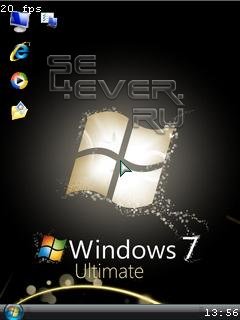
Windows 7


download here

4)

Windows Media Player Mobile 

Windows Media Player Mobile English is a media player for any Java (J2ME) supported phone. The Windows Media Player Mobile (WinMobile) support to play audio files, image viewer, file manger, mouse pointer, take screenshot and lots more.


The new Windows Media Player Mobile v1.0 (also knows as v0.8.7) English version is latest audio and file manager that able to work with almost all java phones. It offer a control panel to manager some of its settings and you also open websites using it, though it'll open link in default browser. It also support to open multiple item same time and easily switch between them like file manager and audio player same time. Thanks for Joekerz for translating to English. 


Features in Windows Media Player Mobile English:
~ File Manager as My Computer
~ Support to change the mouse pointer (cursor)
~ Folding and place of the window
~ Play mp3, amr, wav and midi
~ Open pictures formats jpg and png
~ Set the background image of the filesystem (jpg, and png, with centered or stretching)

WinMobile v1.0 for Java
~ Support to take screenshot. The "camera" to SonyEricsson or the "1", the file will be saved in c :/ other / wm_screen.jpg. It'll save only one screenshot at a time. You can change file save path in Control Panel.
~ System Information in Control Panel


downloadhere


5)      and   6)
just like on ur computer: my computer,control panel,internet explorer,my documents,windows media player..only on ur phone..enjoy

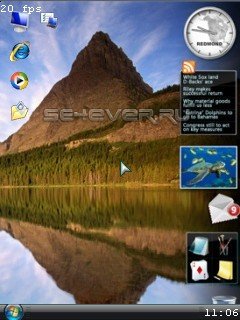
Vista_Win_2.3


download 5 here

download 6here

7)

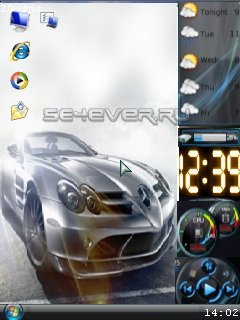
Vista_WinMobile_2.5__New_Desktop


download here


8)

Vista_Win_2.3(New_Desktop)


download here


9)

Windows_7 


download here


10)
mac osx


download here


11)
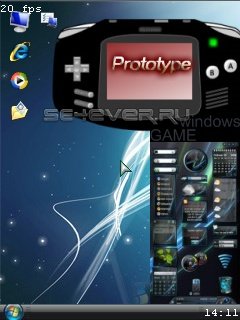
Windows_Prototype


download here


12)


windows 8


download here


download all above software 4 ur java phone n fell windows os in ur fone..enjoy